Run Sample with junit-3.8.1.jar in GUI Mode
Q
How to run sample program with junit-3.8.1.jar in GUI mode? I have Calculator.java and the JUnit test program, CalculatorTest.java ready.
✍: FYIcenter.com
A
 junit-3.8.1.jar is the version 3.8.1 of JUnit JAR library file.
It provides two execution modes: text mode and GUI mode.
junit-3.8.1.jar is the version 3.8.1 of JUnit JAR library file.
It provides two execution modes: text mode and GUI mode.
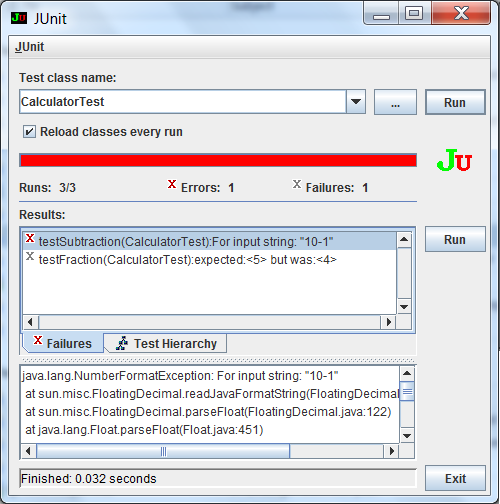
To run the JUnit test program, CalculatorTest.java in GUI mode, you need launch the junit.swingui.TestRunner class and specify the test program class as the parameter:
\fyicenter>java -version
java version "1.8.0_45"

\fyicenter>java -cp .;\local\lib\junit-3.8.1.jar
   junit.swingui.TestRunner CalculatorTest
The test will be performed on a Swing GUI screen with test result displayed, see the picture below:
⇒ FAQ for JUnit (Java Unit) Testing
2016-03-12, ∼4230🔥, 0💬
Related Topics:

