"javaws -viewer" - View Cached Java Applications
Q
How to use the "javaws -viewer" command to view cached Java applications?
✍: FYIcenter
A
 By default, when JavaWS downloads and runs a Java application downloaded from a remote server,
it will keep a copy in the cache on the local computer.
By default, when JavaWS downloads and runs a Java application downloaded from a remote server,
it will keep a copy in the cache on the local computer.
You can use the "javaws -viewer" command to view the list of Java applications stored in the local cache.
fyicenter> javaws -viewer
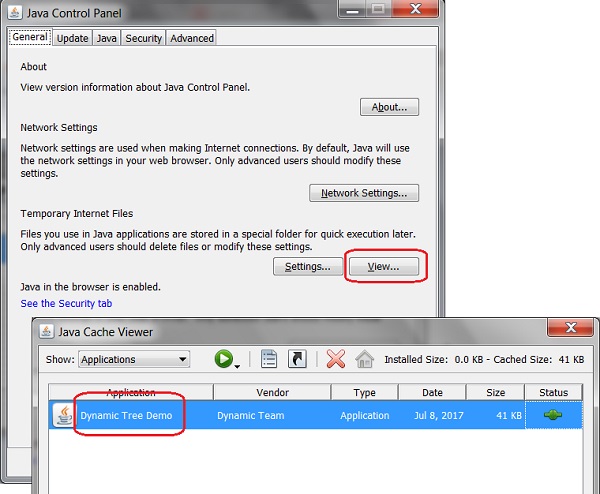
You see two windows showing up:
- Java Control Panel - Manage the Java environment on the local machine.
- Java Cache Viewer - List and manage Java applications stored in the local cache.
The Java Cache Viewer allows you to launch or delete any cached applications.
The following picture shows you the Java Control Panel and Java Cache Viewer windows:
⇒ Remove Applications from JavaWS Cache
⇐ Run JavaWS with JNLP File in Verbose Mode
2018-01-06, ∼6105🔥, 0💬
Related Topics:
