Download and Install JDK 8
How to download and install JDK (Java Development Kit) 8?
✍: FYIcenter
 If you want to write Java applications,
you can download and install JDK (Java Development Kit) 8
as described below:
If you want to write Java applications,
you can download and install JDK (Java Development Kit) 8
as described below:
1. Go to Java SE Downloads Website.
2. Click "Download" button under JDK in the Java SE 8* section. You see the "Java SE Development Kit 8 Downloads" page.
3. Accept the license agreement and click "jdk-8u191-windows-x64.exe" in the Windows x64 line.
4. Save the download file to C:\fyicenter\jdk-8u191-windows-x64.exe.
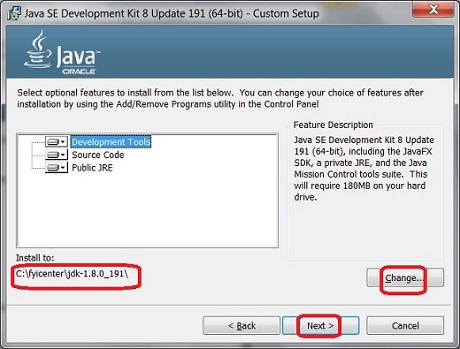
5. Double-click on C:\fyicenter\jdk-8u191-windows-x64.exe to start the installation. You see the JDK 8 installation wizard screen.
6. Change the "Install to" directory to C:\fyicenter\jdk-1.8.0_191\.
7. Click "Next" button to finish the installation.
8. Verify the installation with "java -version" command.
C:>\fyicenter\jdk-1.8.0_191\bin\java -version
java version "1.8.0_191"
Java(TM) SE Runtime Environment (build 1.8.0_191-b12)
Java HotSpot(TM) 64-Bit Server VM (build 25.191-b12, mixed mode)
Download and installation of JDK 8 is done.
2023-09-01, ≈24🔥, 2💬
