Download and Install JDK 1.1
How to download and install JDK (Java Development Kit) 1.1?
✍: FYIcenter
 If you want to write Java applications,
you can download and install JDK (Java Development Kit) 1.1
as described below:
If you want to write Java applications,
you can download and install JDK (Java Development Kit) 1.1
as described below:
1. Go to Oracle Java Archive Website.
2. Click "Java SE 1.1" link. You see the "Java SE 1.1 Archive Downloads" page.
3. Accept the license agreement and click "jdk-1_1_8_010-windows-i586.exe" in the "Windows 95 / 98 / 2000 / NT 4.0 (Intel Platform)" line.
4. Login with your Oracle account (or create one, you don't have one).
5. Save the download file to C:\fyicenter\jdk-1_1_8_010-windows-i586.exe.
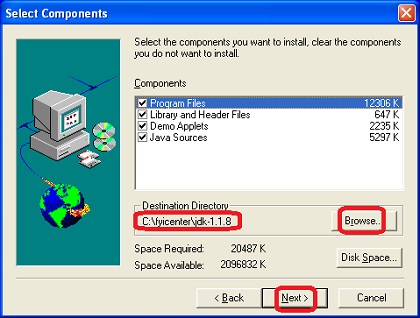
6. Double-click on C:\fyicenter\jdk-1_1_8_010-windows-i586.exe to start the installation. You see the JDK 1.1 installation wizard screen.
7. Change the "Install to" directory to C:\fyicenter\jdk-1.1.8\.
8. Click "Next" button to finish the installation.
9. Verify the installation with "java -version" command.
C:>\fyicenter\jdk-1.1.8\bin\java -version

java version "1.1.8"
Download and installation of JDK 1.1 is done.
2022-12-22, ∼8849🔥, 15💬
Related Topics:
